 |
SWMMVis
6.0.0-alpha.4
Qt6/C++ GIS-based graphical user interface for the SWMMVis engine (6.0.0-alpha.4)
|
|
SWMMVis
6.0.0-alpha.4
Qt6/C++ GIS-based graphical user interface for the SWMMVis engine (6.0.0-alpha.4)
|
Find the version and build information for a bug report, inspect bundled component notices, and understand the licence agreement shown at first launch.
Window title About SWMMVis. A header strip across the top, a filterable master list of components on the left, and licence text plus metadata on the right.
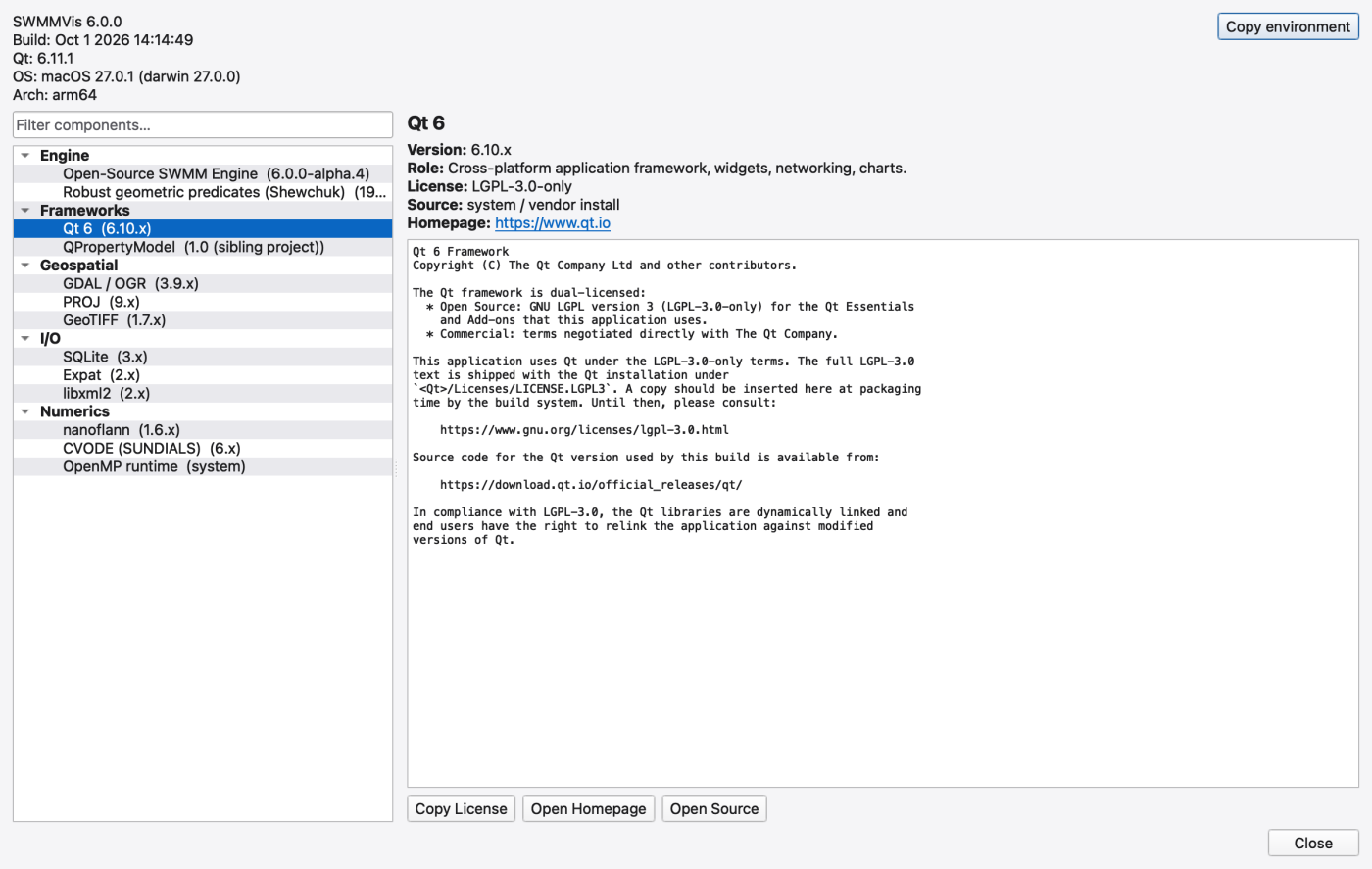
The header strip shows, and the Copy environment button copies:
That block is the first thing to attach to a bug report — its tooltip says so (Copy the build / OS / Qt summary to the clipboard).
The dialog opens with Application → SWMMVis GUI selected. The right pane shows the GUI's GPL-3.0-or-later identifier and the complete repository licence, including the copyright notice. The text wraps to the pane width; Copy License copies the complete text. Select another component to inspect its notice, then select SWMMVis GUI to return to the application licence. Drag the divider between the component list and licence pane to resize them. The component column fills the list width; when a name needs more space, use the horizontal scrollbar at the bottom of the list to read it.
| Control | What it does |
|---|---|
| Filter components… | live-filters the component tree by name |
| a category row | expands or collapses that group |
| a component row | loads its metadata and licence into the right pane |
| Copy License | copies the full licence text to the clipboard |
| Open Homepage | opens the project homepage in your browser |
| Open Source | opens the upstream source-download URL |
| Copy environment | copies the header block above |
Selecting a component shows Version, Role, License (SPDX identifier), Source (provenance — vcpkg, in-tree, vendored, system) and a Homepage link, with the bundled licence text or notice beneath. A component whose manifest names a missing file shows *(license file not found: …)*; one with no licence declared shows *(no license file declared in the manifest)*.
The list comes from an embedded component manifest. Version and provenance labels can be stale; these are the current manifest entries:
| Category | Component | Licence | Provenance |
|---|---|---|---|
| Application | SWMMVis GUI | GPL-3.0-or-later | HydroCouple — openswmm.gui |
| Engine | Open-Source SWMM Engine | Apache-2.0 | in-tree subdirectory |
| Engine | Robust geometric predicates (Shewchuk) | public domain | vendored under vendor/predicates/ |
| Frameworks | Qt 6 | LGPL-3.0-only | system or vendor install |
| Frameworks | QPropertyModel | MIT | vendored sibling project |
| Geospatial | GDAL / OGR | MIT | vcpkg |
| Geospatial | PROJ | MIT | vcpkg |
| Geospatial | GeoTIFF | MIT | vcpkg |
| I/O | SQLite | public domain | vcpkg |
| I/O | Expat | MIT | vcpkg |
| I/O | libxml2 | MIT | vcpkg |
| Numerics | nanoflann | BSD-2-Clause | vcpkg |
| Numerics | CVODE (SUNDIALS) | BSD-3-Clause | in-tree, when 2D is enabled |
| Numerics | OpenMP runtime | Apache-2.0 WITH LLVM-exception (libomp) | system |
HDF5 is linked for the 2D results reader but does not currently have a manifest entry.
At launch, SWMMVis shows a modal License Agreement dialog headed SWMMVis — GNU General Public License v3, with the licence text, a Show this agreement on startup checkbox, and two buttons — Yes, I Agree and No, Exit. Declining exits the application immediately.
Unchecking the box suppresses the dialog on later launches. The preference is stored in the application's settings under SWMMVis/LicenseAgreement/showOnStartup; deleting that key brings the dialog back.
FIGURE PLACEHOLDERdocs/manual/images/a06_license_agreement.png
SWMMVis itself is GPL-3.0-or-later, © 2026 HydroCouple. The current engine repository's LICENSE and the About component manifest identify Apache-2.0; the engine can be used independently of the GUI. Qt 6 is listed under LGPL-3.0.
Some bundled notices are incomplete or stale. The captured Qt entry includes a packaging placeholder for the full licence text. The engine's bundled notice still says MIT, contrary to its current repository licence and manifest. Use the dependency's actual licence files for the complete text; the About notice is not a complete licence archive. Its header reports Qt runtime 6.11.1 in this build, while the static component entry says 6.10.x.
The bundled licence texts are currently a mix of canonical text and pointers to the upstream LICENSE file, and the pointers are clearly marked as such. The version strings come from the manifest rather than from the build system, so a stale version can appear in the dialog even though the linked library is current — check the About dialog against your build environment before quoting a version in a compliance report.
The dialog reads embedded resources. Updating an entry requires rebuilding the application resources:
resources/licenses/<name>.txt.Add a row to resources/about/components.json:
/licenses prefix.| Resource | URL |
|---|---|
| Report an Issue | https://github.com/HydroCouple/openswmm.engine/issues |
| Engine repository | https://github.com/HydroCouple/openswmm.engine |
| GUI repository | https://github.com/HydroCouple/openswmm.gui |
| Engine API reference | https://www.hydrocouple.org/openswmm.engine |
| User manuals | https://www.hydrocouple.org/openswmm.engine/d3/dae/manuals.html |
The first four are also on the Welcome page's Learn SWMM panel.
 1.9.8
1.9.8