 |
SWMMVis
6.0.0-alpha.4
Qt6/C++ GIS-based graphical user interface for the SWMMVis engine (6.0.0-alpha.4)
|
|
SWMMVis
6.0.0-alpha.4
Qt6/C++ GIS-based graphical user interface for the SWMMVis engine (6.0.0-alpha.4)
|
Find out which file formats and compute backends the running build can offer, and how a model asks for a specific engine plugin or process component.
[PLUGINS] table for the open model.[PROCESS_COMPONENTS] row for you.SWMMVis supports native Qt GUI extensions through a public SDK. These can add ribbon commands, docks, document views and preferences. See 26 — GUI extensions for installation and GUI Extensions for authors.
The following mechanisms have different roles:
| Mechanism | Declared in | What it does |
|---|---|---|
| I/O plugins | [PLUGINS] | read or write model, results, report or state files |
| Process components | [PROCESS_COMPONENTS] | add physics — reactions, ARD transport, heat, water age |
| Compute backends | [OPTIONS] FV_BACKEND and [2D_OPTIONS] BACKEND | choose the solver implementation (CPU, OpenMP, CUDA, HIP, SYCL) |
| GUI extensions | Tools → Plugins and user settings | add interface commands, panels, views and preferences |
Window title Plugins. The three roots are Engine I/O plugins, Process components, and GUI extensions. Engine filters are grouped by format role beneath their root. Process-component rows describe the engine catalogue. GUI extension rows include their compatibility and load diagnostics.
| Column | Contents |
|---|---|
| Name | filter, component or extension display name |
| Version / patterns | extension version or file-format globs |
| Vendor / plugin | extension vendor or engine filter provider |
| License / R/W | extension license or filter R, W, RW capabilities |
| Built against | extension SDK, Qt and architecture identity |
| Status | availability or extension load/restart state |
| Details | compatibility errors and startup/recovery messages |
The role groups are: Input (read), Results (read), Results (write), Report (write), Hot-Start (read), Hot-Start (write), Project (read), Project (write), Vector (read), Raster (read), Tabular (read), Map Export (write) and Component Config (read).
Rescan refreshes engine filters and GUI extension metadata. Add directory… adds an existing GUI plugin directory. Open plugin folder opens the user extension directory. GUI extension checkboxes change the next-launch enable state; restart to load new extensions or disable already loaded extensions. Engine filter and process-component rows remain informational.
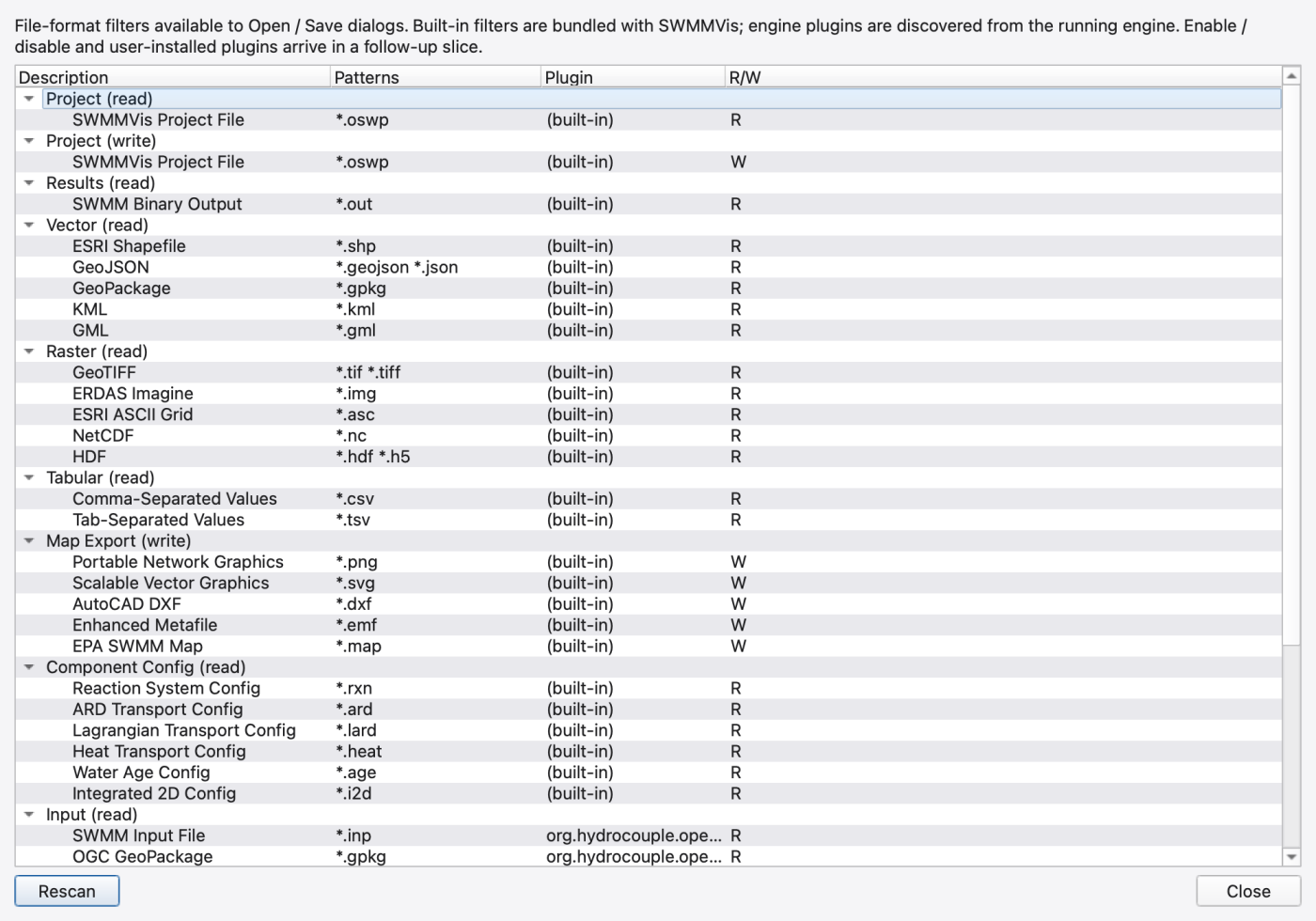
GUI built-in filters: *.oswp (project read and write), *.out (SWMM binary output, read), the vector set (*.shp, *.geojson *.json, *.gpkg, *.kml, *.gml), the raster set (*.tif *.tiff, *.img, *.asc, *.nc, *.hdf *.h5), tabular (*.csv, *.tsv), map export (*.png, *.svg, *.dxf, *.emf, *.map) and component configs (*.rxn, *.ard, *.lard, *.heat, *.age, *.i2d).
Engine-contributed filters: *.inp (input read), *.out (output write), *.rpt (report write), *.hs (state read and write), *.hsf (state read only), and *.gpkg when the GeoPackage plugin is compiled in.
All are built in — statically linked, registered at start-up, and loaded without any file on disk:
| Id | Name | Formats |
|---|---|---|
org.hydrocouple.openswmm.builtin.input | Default SWMM Input Plugin | .inp read and write |
org.hydrocouple.openswmm.builtin.output | Default SWMM Output Plugin | .out |
org.hydrocouple.openswmm.builtin.report | Default SWMM Report Plugin | .rpt |
org.hydrocouple.openswmm.builtin.state_io | Default Hot-Start / State IO Plugin | .hs |
org.hydrocouple.openswmm.plugins.geopackage | GeoPackage | .gpkg — input read, output write, report write; present only when the engine was built with GeoPackage support |
There is no shipped example loadable I/O plugin. The only genuine shared objects in either repository are the GPU compute backends (below).
The 2D HDF5 writer is a built-in output plugin, but it is special: it is instantiated directly by the engine when a model has 2D enabled, it registers no id, and it does not appear in the Plugins dialog or in the format registry.
Its only control is **[2D_OPTIONS] OUTPUT_FILE**. An empty value means no 2D output is written; a relative path is resolved against the .inp's directory. REPORT_2D toggles reporting independently. See A2 — File Formats for the datasets it writes.
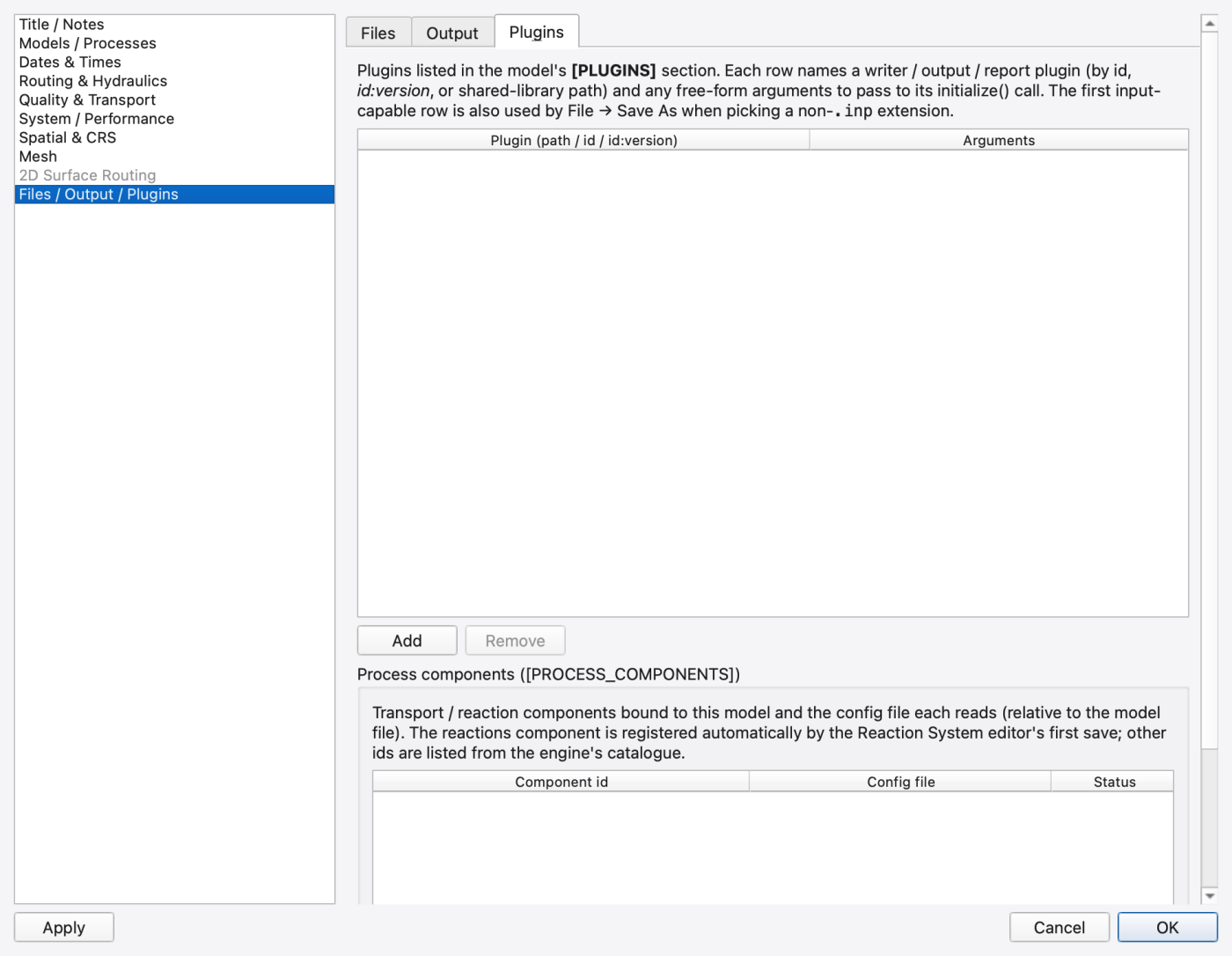
Simulation Options → Files / Output / Plugins → Plugins edits the open model's [PLUGINS] section. Its intro reads:
Plugins listed in the model's
[PLUGINS]section. Each row names a writer / output / report plugin (by id, id:version, or shared-library path) and any free-form arguments to pass to itsinitialize()call. The first input-capable row is also used by File → Save As when picking a non-.inpextension.
Two columns:
| Column | Contents |
|---|---|
| Plugin (path / id / id:version) | placeholder plugin id, id:version, or library path; the … browse button opens Choose Plugin Library with a per-platform filter (*.dll; *.dylib *.so *.bundle; *.so) |
| Arguments | free-form tokens passed verbatim to the plugin |
Add and Remove manage rows. Remove is greyed for a built-in plugin id, with the tooltip:
*"…" is a built-in plugin statically linked into the engine — removing the row would have no effect (the plugin stays loaded in-process).*
An empty first column is a validation error: [PLUGINS] row N: plugin id / path is required.
Above the table are combo boxes selecting which plugin id drives the input writer, the results output and the report; applying makes sure each non-empty id has a matching table row.
On OK or Apply, the table is diffed against the engine: new or changed rows are set, and engine rows no longer in the table are removed. The result is written into the model's [PLUGINS] section, so the setting is per project, not per user, and nothing is stored in preferences.
The whole group is disabled — Not available in SWMM 5 (legacy engine). — when the project is bound to a legacy engine.
Row syntax in the file is one plugin per line: the first token is the library path, id, or id:version, and everything after it is passed through as initialisation arguments.
No path rebasing or quoting is applied on write.
The engine's plugin factory runs a fixed search at start-up:
.so / .dylib / .dll in the directory of the engine shared library.<engine library dir>/plugins**.<engine library dir>/components**.Each candidate is opened and must export the plugin-info entry point; libraries that do not are skipped silently.
An explicit [PLUGINS] row is then resolved: a token containing a path separator or a shared-library extension is loaded directly; anything else is looked up in the registry by id:version first and then by id, and the first-loaded wins.
There is no OPENSWMM_PLUGIN_PATH environment variable and no user-managed plugin path for I/O plugins. To add one, put the library next to the engine library or in its plugins subdirectory.
Compute backends use a different search (see below).
A process component adds physics rather than file formats. Row syntax is the component id followed by key="value" pairs; a token without = is a hard error. Only config= is special-cased — it names the component's sidecar configuration file, resolved relative to the .inp.
Registering a component enables it. Duplicate ids are refused, and a component config file may not contain a nested [PROCESS_COMPONENTS] section.
| Id | State |
|---|---|
org.hydrocouple.openswmm.reactions | implemented |
org.hydrocouple.openswmm.transport.ard | implemented |
org.hydrocouple.openswmm.heat | implemented |
org.hydrocouple.openswmm.waterage | implemented |
org.hydrocouple.openswmm.transport.lard | placeholder only — the Lagrangian solver is selected with [OPTIONS] QUALITY_SOLVER LAGRANGIAN and takes no config file |
org.hydrocouple.openswmm.integrated2d | not implemented |
The shared-library-path form of a component row is documented but reserved; only registered ids resolve today.
In the GUI, there is no general component editor. The only automatic registration happens in the Reaction System editor: pressing Save to File with no reactions component bound asks
Create reactions component — No reactions component is bound to this model. Register one and create its config file (model.rxn beside the project input)?
and registers org.hydrocouple.openswmm.reactions with the relative path model.rxn. Every other component row is written by hand.
(The Quality & Transport page's note claiming the ARD component file is bound on the Files / Output / Plugins page is stale — no such control exists.)
The finite-volume 1D solver and the 2D marcher can each run on a Kokkos-backed compute plugin instead of the built-in CPU code.
| Where | Key | Values | Default |
|---|---|---|---|
[OPTIONS] | FV_BACKEND | CPU, AUTO, OMP, CUDA, HIP, SYCL | *(engine default)* |
[2D_OPTIONS] | BACKEND | AUTO, CPU, OMP, CUDA, HIP, SYCL | AUTO |
An unknown FV_BACKEND token is ignored silently; an unknown [2D_OPTIONS] BACKEND is rejected with Unknown BACKEND: <v> (expected AUTO|CPU|OMP|CUDA|HIP|SYCL).
AUTO tries the available plugins in the order cuda → hip → sycl → omp, then falls back to the built-in CPU solver. Naming a backend explicitly loads that plugin outright and bypasses the model-size gate that AUTO respects. A missing plugin or an absent device falls back to CPU with a notice on stderr — never a hard failure. FV_PRESSURIZED_IMPLICIT forces CPU regardless of the request.
Environment variables take precedence over the deck: **OPENSWMM_FV_BACKEND** overrides FV_BACKEND, and **OPENSWMM_2D_BACKEND** overrides [2D_OPTIONS] BACKEND.
In the GUI, the 2D backend is the Backend: combo in the Performance group of Simulation Options → 2D Surface Routing → Performance & Output, with the entries Auto, CPU (built-in marcher), OpenMP (Kokkos), CUDA, HIP and SYCL.
Compute plugins have their own search path, unlike I/O plugins:
OPENSWMM_GPU_PLUGIN_PATH** (:-separated, ; on Windows);<engine library dir>/gpu.The filenames probed are libopenswmm_gpu_<backend> with the platform's shared-library extension. A candidate must export the probe and factory symbols and match the ABI version.
Backends are a build-time choice: the CMake option selects exactly one target per configure, defaulting to OpenMP. A stock build therefore produces the Kokkos-OpenMP plugin only. CUDA, HIP and SYCL are fully wired in code and CMake but require the corresponding vendor toolchain and a Kokkos built with that backend enabled — the configure hard-errors otherwise. The portable base build ships with the GPU plugin off entirely and stays Kokkos-free; OpenMP is distributed as a separate package.
So if the Backend: combo lists CUDA but selecting it silently falls back to CPU, the plugin simply is not present in your build.
FIGURE PLACEHOLDERdocs/manual/images/a03_backend_combo.png
*.gpkg under Input (read).[PLUGINS] row does nothing; built-ins are statically linked and always loaded. The dialog greys the button and says so.[PLUGINS] row is per model. Copying a model to another machine copies the requirement with it — if that machine lacks the library, the run fails at open.[PROCESS_COMPONENTS] config paths are relative to the .inp. Move the .inp and take the sidecars with it, or the components will not load.[OPTIONS] switch is off (WATER_AGE, HEAT_TRANSPORT) loads and then warns that it has nothing to do.Default2DOutputPlugin never needs a [PLUGINS] row. If you do not get a .2d.h5, check [2D_OPTIONS] OUTPUT_FILE and REPORT_2D, not the plugin list..inp in either repository actually uses [PLUGINS]. The section is exercised through the API; the example above is from the parser's own documentation. 1.9.8
1.9.8