 |
SWMMVis
6.0.0-alpha.4
Qt6/C++ GIS-based graphical user interface for the SWMMVis engine (6.0.0-alpha.4)
|
|
SWMMVis
6.0.0-alpha.4
Qt6/C++ GIS-based graphical user interface for the SWMMVis engine (6.0.0-alpha.4)
|
Take a five-junction pipe with one steady inflow and load it with everything SWMM 6 can transport: two pollutants, a multispecies reaction system with a temperature-dependent decay, water age, and heat. Then switch the quality solver between the legacy complete-mix router, the Eulerian ARD engine and the Lagrangian segment engine, and see the three answers side by side.
No shipped example covers this, so the tutorial ships its own model in docs/manual/tutorials/models/.
[POLLUTANTS] and [INITIAL_QUALITY][OPTIONS] QUALITY_SOLVER, WATER_AGE, HEAT_TRANSPORT, OUTFALL_BACKFLOW_QUALITY, QUALITY_STEP, DISPERSION[PROCESS_COMPONENTS] and the four sidecar config files it binds[REACTION_OPTIONS], [REACTION_SPECIES], [REACTION_COEFFICIENTS], [REACTION_PIPES], [REACTION_TANKS], [REACTION_QUALITY][WATER_AGE_SOURCES][HEAT_SOURCES], [HEAT_FLUXES], [RADIATIVE_FLUXES], [SOLAR_RADIATION] and the main-file [TEMPERATURE] blockAll in docs/manual/tutorials/models/:
| File | Role |
|---|---|
transport_demo.inp | the model |
transport_demo.rxn | reaction system (component …reactions) |
transport_demo.ard | Eulerian ARD options (component …transport.ard) |
transport_demo.age | water-age source ages (component …waterage) |
transport_demo.heat | heat sources, flux modules, radiative and solar forcing (component …heat) |
Copy the whole folder somewhere writable first — running the model writes .out, .rpt and possibly a detailed-output file next to the .inp.
FIGURE PLACEHOLDERdocs/manual/images/t07_model_layout.png
File → Open… → transport_demo.inp. Five junctions J1…J5 on a descending invert, five 100 m CIRCULAR 1.0 conduits C1…C5, and a free outfall OUT1. A constant 0.2 m³/s inflow enters at J1.
The transport switches live in [OPTIONS]:
| Key | Values | What it does |
|---|---|---|
QUALITY_SOLVER | LEGACY, EULERIAN_ARD (or ARD), LAGRANGIAN (or LARD) | which quality router runs |
WATER_AGE | ON / YES | registers the reserved species __WATER_AGE__ and reports it |
HEAT_TRANSPORT | ON / YES | registers __TEMPERATURE__ as the last reported column |
Two things to be clear about, because they are easy to get wrong:
WATER_AGE ON and HEAT_TRANSPORT ON are main-file [OPTIONS] keys, and they are the master switches. Registering the waterage or heat process component does not turn them on; the component only supplies source ages, inlet temperatures and flux modules. With the option off you get a warning and nothing is tracked. With IGNORE_QUALITY YES you get a warning and nothing is tracked either.[WATER_AGE_SOURCES], [RADIATIVE_FLUXES] and [SOLAR_RADIATION] are not .inp sections. They live in the component config files. The main file's [TEMPERATURE] block is an .inp section, and heat needs it — it supplies the air temperature, humidity and wind speed that the surface-exchange and atmospheric-longwave modules consume:Open the pollutant editor: Model → Data Objects → Pollutants…. The dialog is titled Pollutants and has a list on the left with New / Delete, and a form on the right:
| Field | Writes to [POLLUTANTS] |
|---|---|
| Name | Name |
Concentration Units (MG/L, UG/L, #/L) | Units |
| Rain Concentration | Crain |
| GW Concentration | Cgw |
| I&I Concentration | Crdii |
| Initial Concentration | Cinit |
| Decay Coefficient (1/days) | Kdecay |
| Molecular Weight | — |
| Snow Only (Buildup occurs only in snow) | SnowOnly |
| Co-Pollutant | CoPollut |
| Co-Fraction | CoFrac |
Names are SWMM identifiers: no spaces. The
.inpis whitespace-delimited, soTotal Nitrogenwould be saved asTotal; useTotal_N. The editor refuses names with spaces (and;,[,]).
FIGURE PLACEHOLDERdocs/manual/images/t07_pollutant_name_rule.png
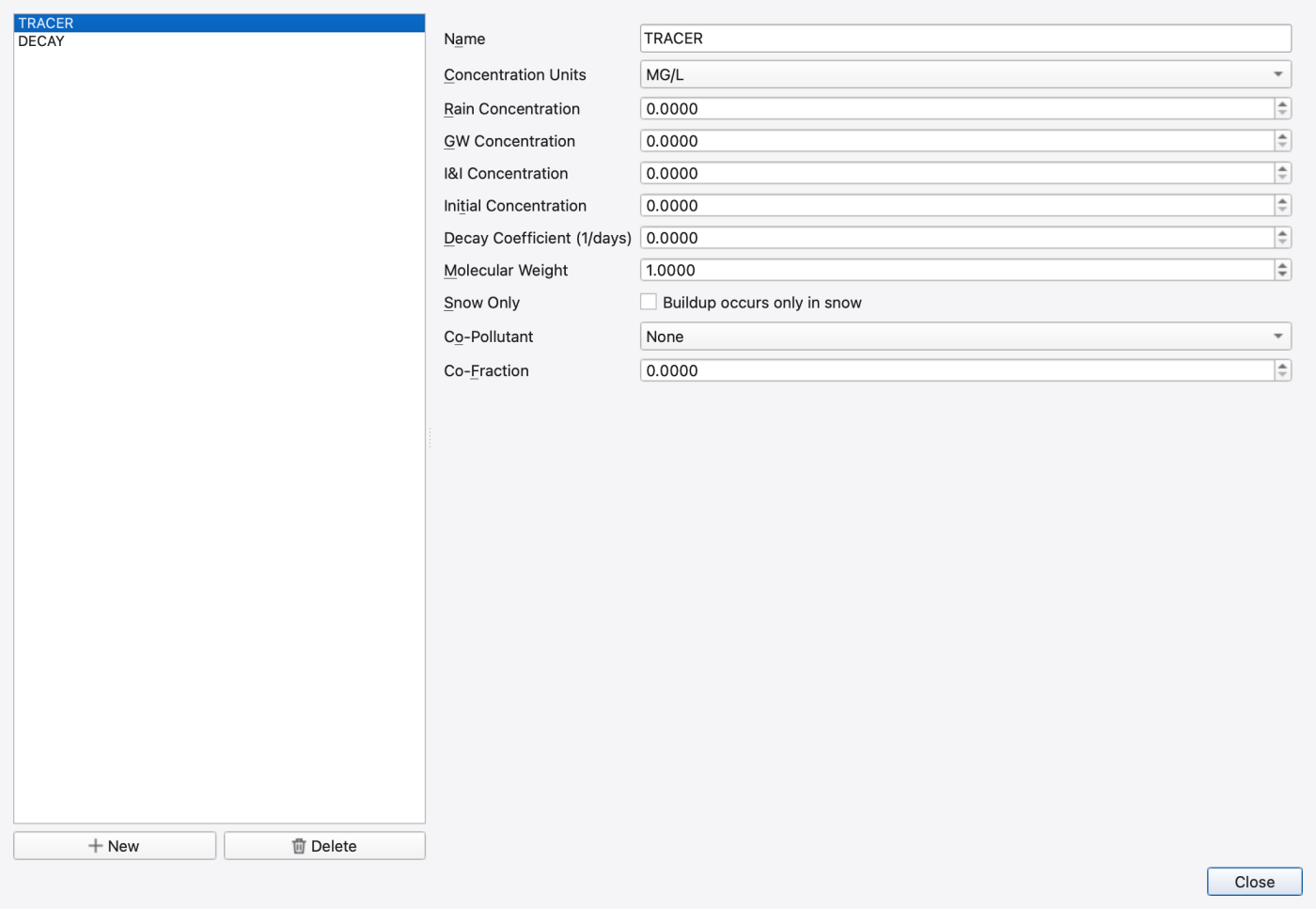
The dialog has no OK button — edits go straight to the model through the pollutant provider and the Close button just dismisses it. One gotcha: the units of a pollutant are write-once at engine creation, so the combo only takes effect for a pollutant that has not been created yet.
The model already defines two:
TRACER is conservative (Kdecay 0). DECAY has a legacy first-order decay coefficient of 2.0 /day, applied by the quality router itself. The temperature-dependent chemistry comes later, from the reaction system, and uses its own species — reaction species may not share a name with a pollutant.
Both enter at J1 as constant-concentration inflows, alongside the flow and the inlet temperature:
__TEMPERATURE__ and __WATER_AGE__ are reserved constituent names. Using them in [INFLOWS] is how you give age or temperature a time-varying boundary condition — the component config files only take constants.
The same fields appear as rows in the Properties panel, and as columns of the attribute table's ◇ Data: Pollutants table (one row per pollutant), so a pollutant can also be edited without opening the dialog.
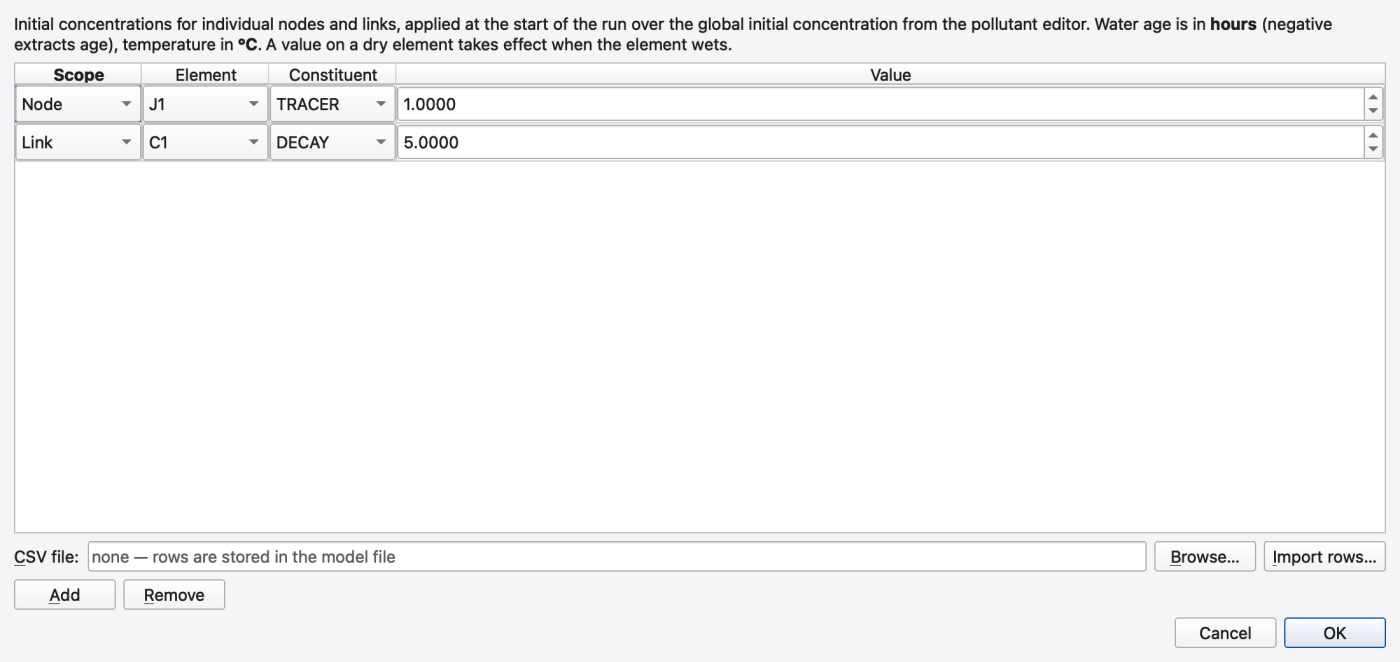
Model → Initial Quality… opens the Initial Quality dialog — per-node and per-link starting concentrations, applied over the global initial concentration from the pollutant editor.
The table has four columns — Scope, Element, Constituent, Value — with Add and Remove buttons. Scope is Node or Link; there is no subcatchment scope, because [INITIAL_QUALITY] is node/link only. The Constituent combo lists every pollutant, then Water age (hours) and Temperature (°C) — but only when WATER_AGE and HEAT_TRANSPORT respectively are on. Water age is in hours and a negative value extracts age (the water reads younger); temperature is in °C. A value on a dry element takes effect when the element wets.
The same dialog is reachable two other ways: from the Initial Quality row in a node's or link's Properties panel (the cell shows a summary plus an Edit… button, and the dialog opens scoped to that element), and from the Edit Initial Quality… button on the Simulation Options Quality & Transport page. The attribute table also carries one Init. <pollutant> column per pollutant, plus Init. Water Age (hr) and Init. Temperature (°C).
The shipped input has no [INITIAL_QUALITY] overrides. To reproduce the populated example below, save a separate copy and add Node / J1 / TRACER / 1.0 and Link / C1 / DECAY / 5.0, in mg/L. The same variant was run successfully and the dialog read back both rows. These values override the global initial concentrations; they do not replace the continuously supplied inflow concentrations. Keep this variant separate from the solver comparison.
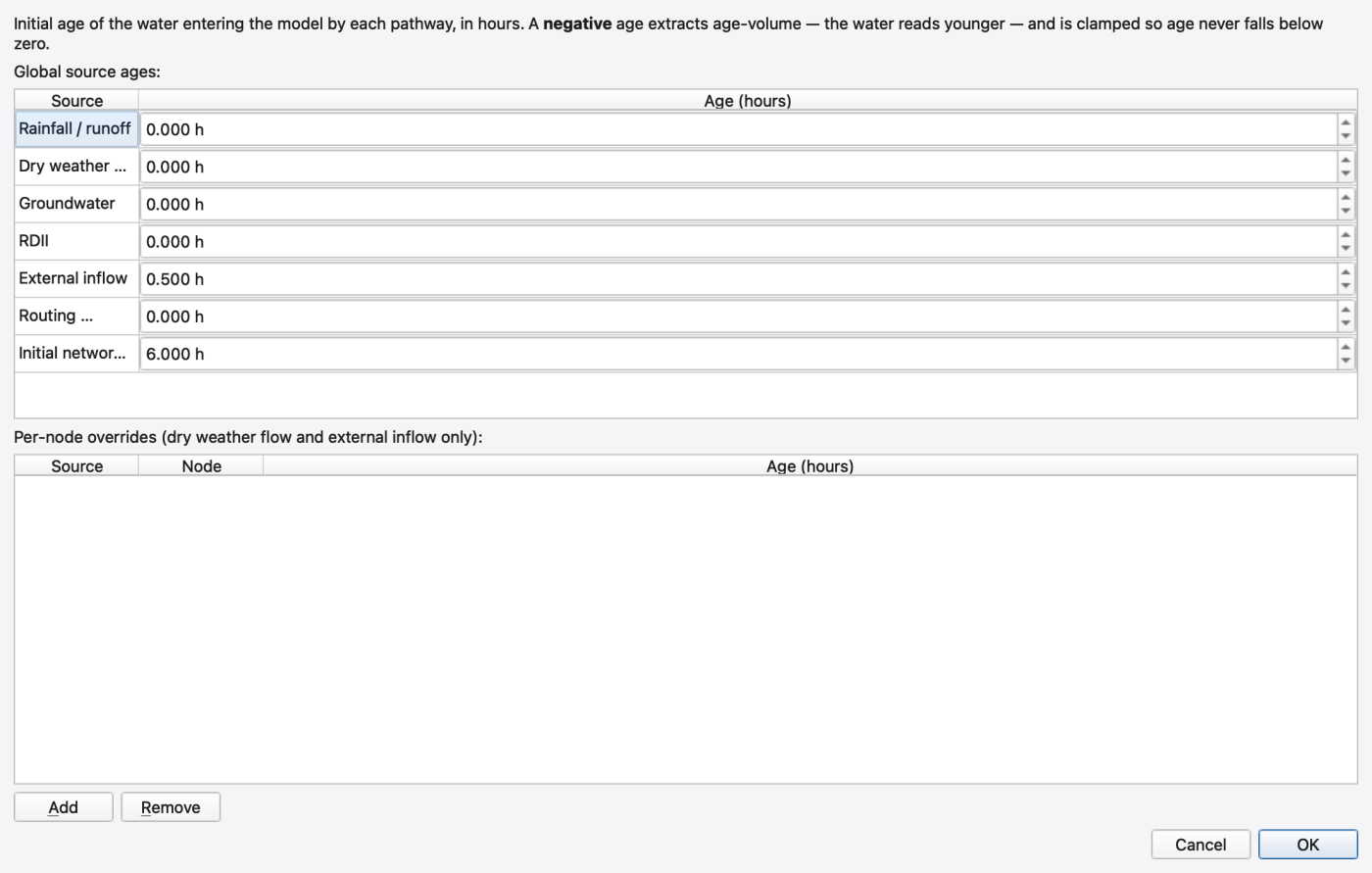
Model → Water Age Sources… opens the Water Age Sources dialog. It writes [WATER_AGE_SOURCES] in the .age component file.
The top table, Global source ages:, has two columns — Source and Age (hours) — with seven fixed rows: Rainfall / runoff, Dry weather flow, Groundwater, RDII, External inflow, Routing interface file, Initial network state. Underneath, Per-node overrides (dry weather flow and external inflow only): takes Source, Node and Age (hours) rows with Add / Remove. The restriction is real — the engine rejects NODE scope for any source other than DWF and external inflow.
Ages are in hours; negative ages are legal and deliberate — they extract age-volume so the water reads younger, clamped so age never falls below zero.
The tutorial model's file is:
The component assigns 6 h to initial network water and 0.5 h to external inflow. The shipped junctions start with zero depth, so this is not a pre-filled six-hour-old pipe. The recorded downstream age approaches the source age plus network residence time; do not expect the initial-state value to appear in the first output record.
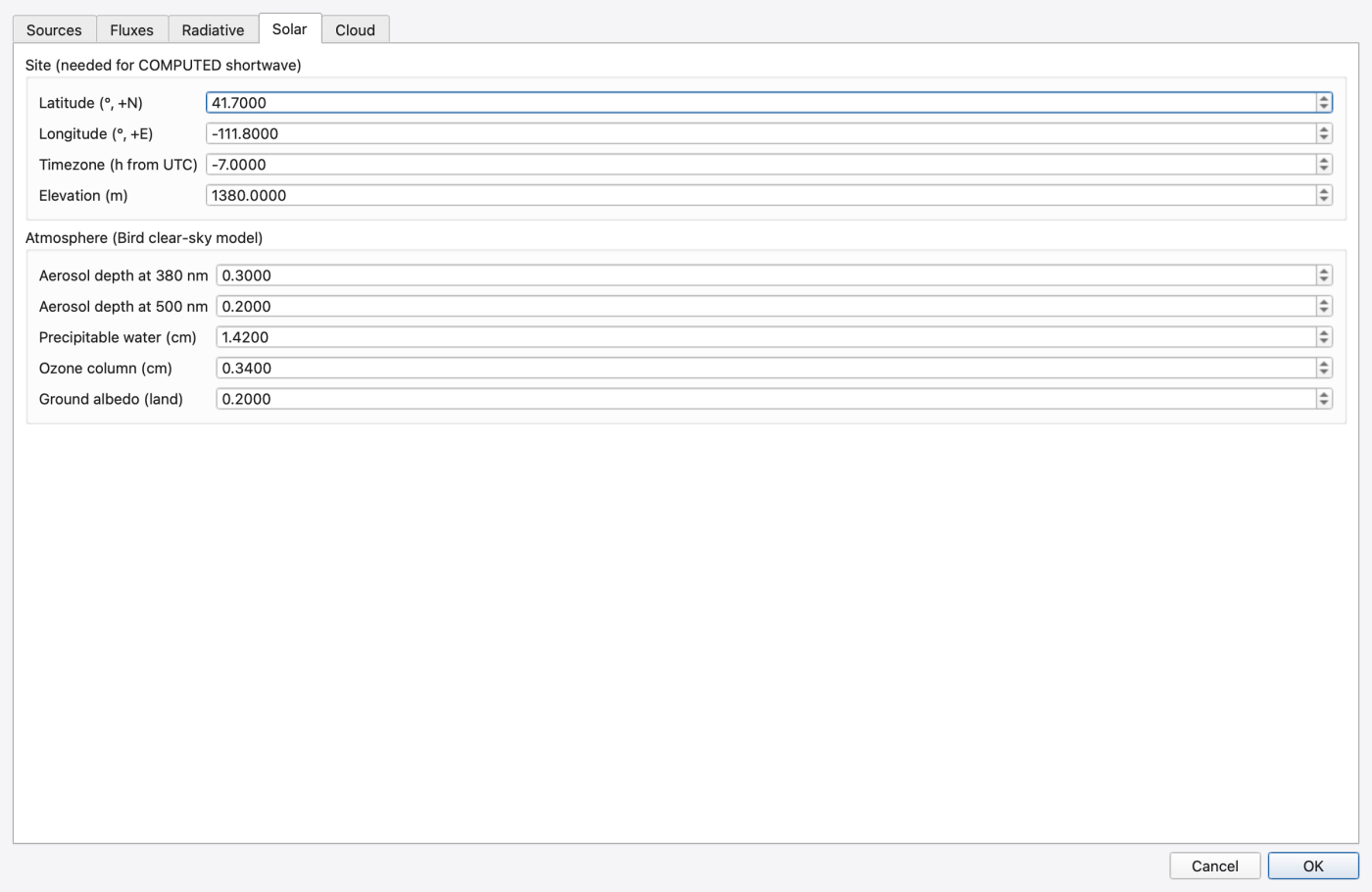
Model → Heat Configuration… opens the Heat Configuration dialog, which writes the .heat component file. Five tabs:
| Tab | Writes | Contents |
|---|---|---|
| Sources | [HEAT_SOURCES] | table of Source / Set / Temperature over the same seven pathways as water age, plus per-node overrides for DWF and external inflow. An unchecked source takes the 20 °C default and writes no row. Range −50…100 °C. |
| Fluxes | [HEAT_FLUXES] | three checkboxes — Surface exchange (latent + sensible), Radiative exchange (shortwave + longwave), LID layer conduction |
| Radiative | [RADIATIVE_FLUXES] | Incoming shortwave radio group: Constant (0–1500 W/m²), Timeseries, Computed (solar position + Bird clear sky); then Radiative parameters — Water albedo Rs, Shade factor fs, Sky view fsky, Water emissivity, Land-cover emissivity, Brunt atmospheric coeff., Longwave reflection RL |
| Solar | [SOLAR_RADIATION] | Site (needed for COMPUTED shortwave) — Latitude (°, +N), Longitude (°, +E), Timezone (h from UTC), Elevation (m); Atmosphere (Bird clear-sky model) — Aerosol depth at 380 nm, Aerosol depth at 500 nm, Precipitable water (cm), Ozone column (cm), Ground albedo (land) |
| Cloud | [CLOUD_COVER] | Cloud cover configured gate, Fraction [0..1], Shortwave atten. k, Shortwave atten. n, Longwave cloud k, and a Fraction timeseries combo |
The tutorial model's .heat file:
Choosing Computed without a latitude and longitude is a hard error; the dialog says so (Set latitude and longitude on the Solar tab first.). A missing timezone only warns. The [SOLAR_RADIATION] block is consulted only under SHORTWAVE GLOBAL COMPUTED — set a constant or a timeseries and the engine warns that the site block is unused.
Two limitations worth knowing. The engine exposes the shortwave and cloud timeseries mode but not the bound series name, so those combos rebind rather than display what is currently set — the (keep current series) position is the no-op. And [SEDIMENT_EXCHANGE], which the engine accepts in a .heat file, has no GUI at all; edit it by hand.
Model → Climate → Solar Radiation does not open the heat dialog and does not write [SOLAR_RADIATION]. There is no [SOLAR_RADIATION] section in the main .inp grammar at all. The action opens the Climatology dialog on its Evaporation tab, because solar radiation feeds Hargreaves evapotranspiration. The Climatology dialog's tabs are Temperature, Evaporation, Wind Speed, Snow Melt, Areal Depletion and Adjustments, and it writes the legacy climate sections — including the [TEMPERATURE] block that the heat module reads.
So: Climatology → Temperature for air temperature and humidity; Heat Configuration → Solar for the solar geometry the Bird clear-sky model needs.
Model → Reaction System… opens the Reaction System editor. Its title becomes Reaction System — <file> once a config file is bound, or Reaction System — (no file bound).
Eight tabs, of which seven are usable:
| Tab | Writes | Columns / controls |
|---|---|---|
| Options | [REACTION_OPTIONS] | Solver: (EUL, RK5, ROS2, BDF2), Coupling: (NONE, FULL), Rate units: (SEC, MIN, HR, DAY), Area units: (FT2, M2, CM2), Reaction step (s, 0 = quality step):, Absolute tolerance:, Relative tolerance: |
| Species | [REACTION_SPECIES] | Kind (BULK / WALL), Name, Units, Atol, Rtol — with Add / Remove |
| Coefficients | [REACTION_COEFFICIENTS] | Kind (PARAMETER / CONSTANT), Name, Value |
| Terms | [REACTION_TERMS] | Name, Expression |
| Expressions | [REACTION_PIPES] / [REACTION_TANKS] | Species, Scope (Pipes / Tanks), Form (RATE, EQUIL, FORMULA, or None), Expression |
| Initial Quality | [REACTION_QUALITY] | global Species / Value, plus per-node and per-link overrides (Scope, Element, Species, Value) |
| File | the raw .rxn | monospace editor with a syntax highlighter, live validation, Discard text edits |
| Sources | — | disabled: [REACTION_SOURCES] arrives with engine phase R-sources; the engine rejects the section today, so there is nothing to edit. |
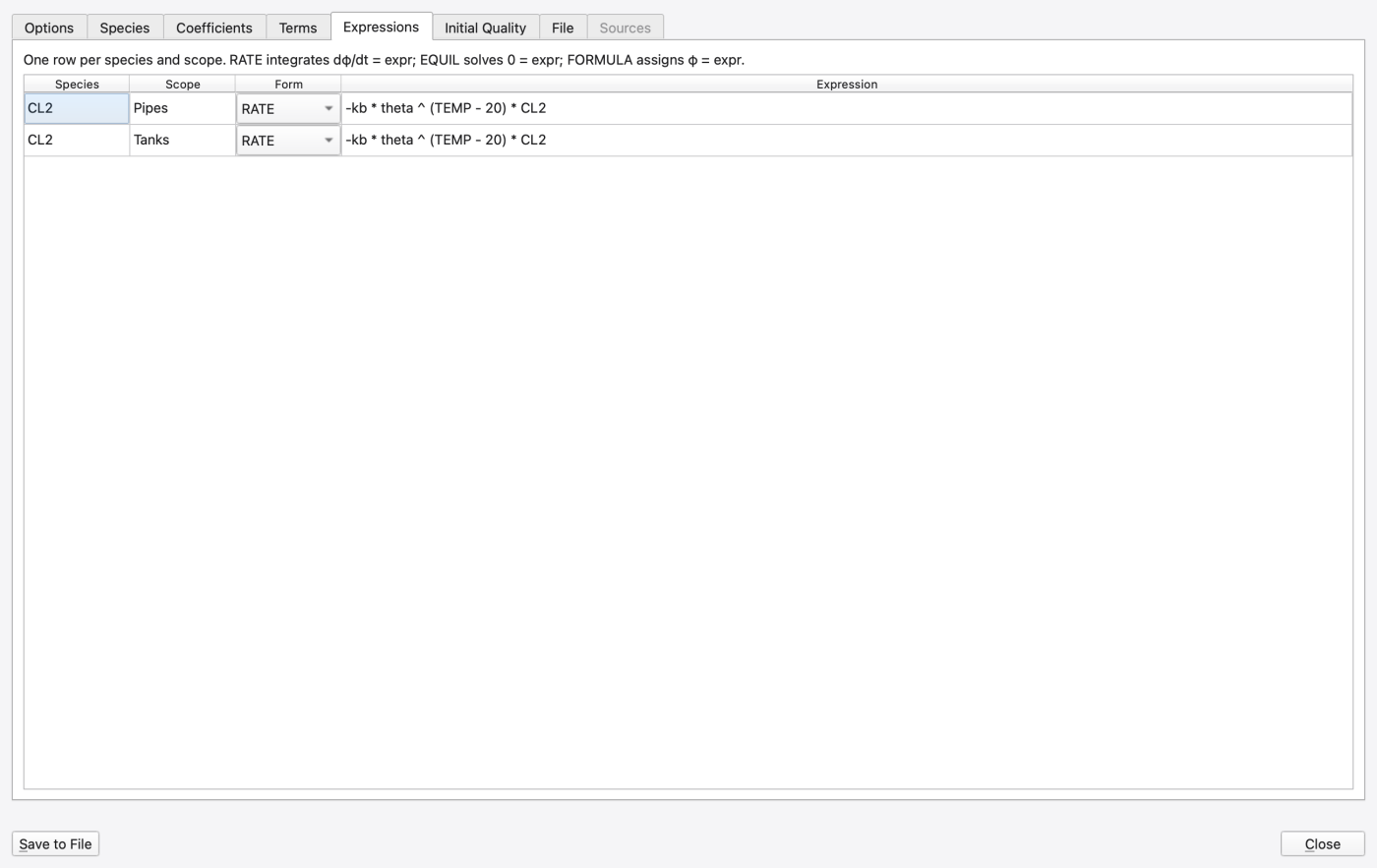
The Expressions tab's hint states the semantics exactly: RATE integrates dφ/dt = expr; EQUIL solves 0 = expr; FORMULA assigns φ = expr.
The tutorial's .rxn is one species with an Arrhenius correction:
TEMP is a hydraulic variable available to every expression, alongside D, Q, U, RE, US, FF, AV, HRT and DT. Because HEAT_TRANSPORT is on, TEMP is the heat module's computed water temperature, so the decay rate tracks the diurnal warming supplied by the air-temperature series. With heat off, TEMP falls back to the [REACTION_OPTIONS] TEMPERATURE constant — which is why the file still sets it to 20.
The expression editor is validated live against the engine. Its vocabulary — species, coefficients, terms, hydraulic variables and functions (EXP, LOG, LOG10, SQRT, ABS, SGN, STEP, SIN, COS, TAN, MIN, MAX, POW) — comes from the engine, not a hard-coded list, and a completer offers them as you type. A rejected expression is refused with Expression rejected — the previous one is kept. Removing a species, coefficient or term that an expression still references is refused as well.
Binding the file. If the model has no reactions component when you press Save to File, the editor offers to create one:
Create reactions component — No reactions component is bound to this model. Register one and create its config file (model.rxn beside the project input)?
Answering yes registers org.hydrocouple.openswmm.reactions with the relative path model.rxn. That is the only place SWMMVis writes a [PROCESS_COMPONENTS] row — there is no general component editor with an id and a config path. The tutorial model's row set was written by hand:
Structured edits in the tabs apply to the engine as you make them; only the file itself waits for Save to File.
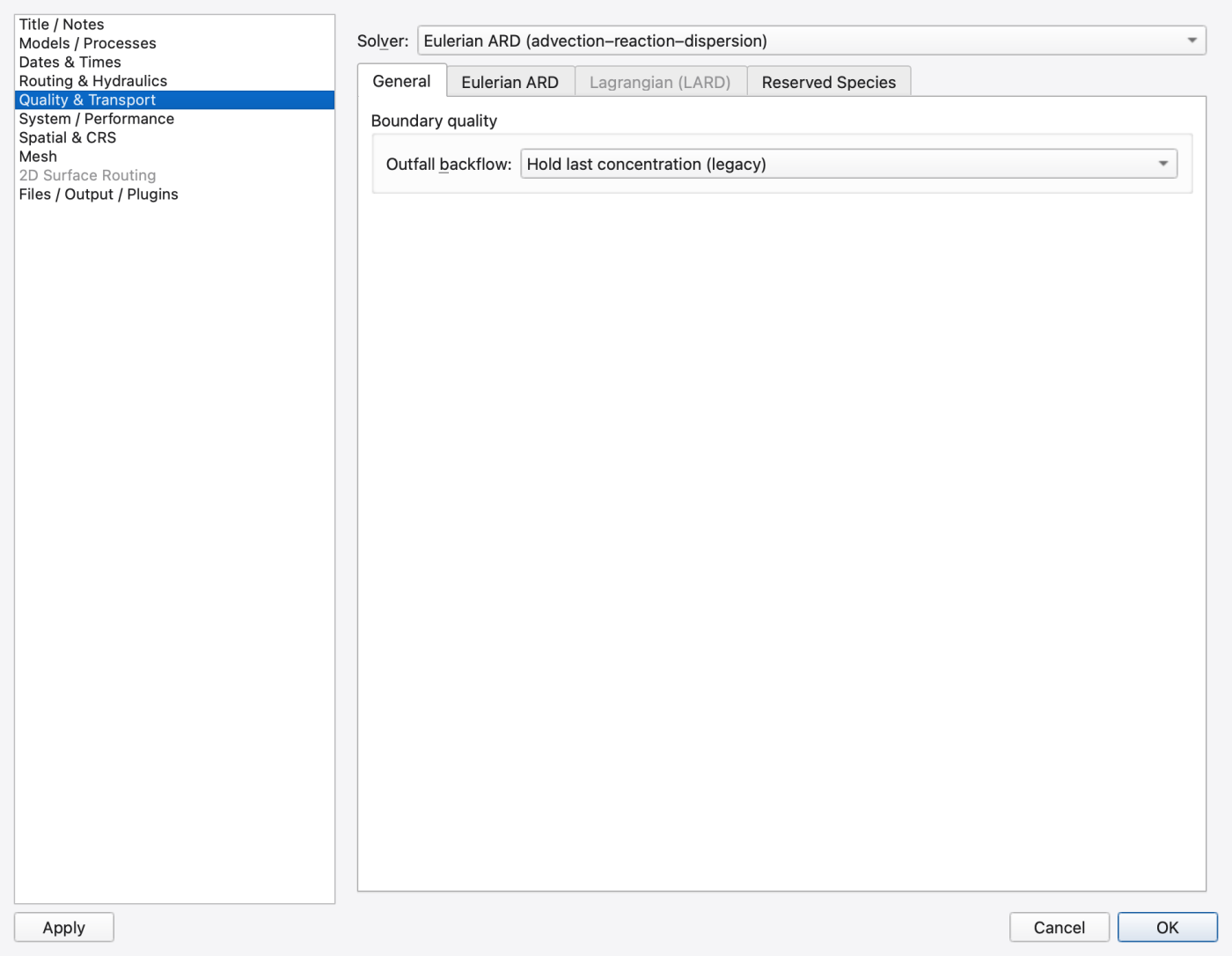
Open Simulation Options (Model → Simulation Options) and pick the Quality & Transport category. The dialog's categories, in order, are Title / Notes, Models / Processes, Dates & Times, Routing & Hydraulics, Quality & Transport, System / Performance, Spatial & CRS, Mesh, 2D Surface Routing and Files / Output / Plugins (the last three are conditional).
The Solver: selector is in the page header, above the tab bar, because it gates two of the four tabs below it.
| Tab | Control | Writes |
|---|---|---|
| *(page header)* | Solver: — Legacy (complete mix), Eulerian ARD (advection–reaction–dispersion), Lagrangian (LARD) | QUALITY_SOLVER |
| General | Outfall backflow: — Hold last concentration (legacy), Fresh (zero concentration and age) | OUTFALL_BACKFLOW_QUALITY |
| Eulerian ARD *(live only for that solver)* | Scalar scheme: — MUSCL, Upwind, QUICKEST-ULTIMATE | FV_SCALAR_SCHEME |
| Lagrangian (LARD) *(live only for that solver)* | Quality step: (0–3600 s) | QUALITY_STEP |
| Max segments per link: (2–10000) | MAX_SEGMENTS_PER_LINK | |
| Dispersion: — Off, RWPT (random-walk particle tracking) | DISPERSION | |
| RWPT seed: *(enabled only with RWPT)* | RWPT_SEED | |
| Reserved Species | Track water age | WATER_AGE |
| Simulate heat transport | HEAT_TRANSPORT | |
| Edit Source Ages… | opens the Water Age Sources dialog | |
| Edit Initial Quality… | opens the Initial Quality dialog |
Note carefully which knobs live where:
QUALITY_STEP and DISPERSION in [OPTIONS] are LARD-only.** Set them with another solver and the engine warns that they have no effect. The dialog greys the whole Lagrangian (LARD) tab accordingly — the settings are still written, so you can configure LARD before switching to it.ARD dispersion is configured in the .ard file, not in [OPTIONS]. The page says so in its own note. The tutorial's transport_demo.ard is:
DISPERSION there takes OFF, FISCHER, or a non-negative numeric dispersion coefficient in display length units squared per second. The file also accepts [CONDUIT_DISPERSION] (per-conduit values), [TRANSPORT_BOUNDARIES] (<node> <species> VALUE|TIMESERIES …) and [TRANSPORT_SOURCES] (the same, conduit-scoped).
That page's note also claims the ARD component file is bound on the Files / Output / Plugins page. It is not — that page's sub-tabs are Files, Output and Plugins, and none of them binds a process component. Treat the note as stale and edit [PROCESS_COMPONENTS] by hand.
IGNORE_QUALITY is not on this page.** It is the Water quality checkbox in the Active processes group of the Models / Processes page, with inverted sense: unchecking it writes IGNORE_QUALITY YES.If the whole page is disabled, the project is bound to a legacy SWMM 5 engine (Not available in SWMM 5 (legacy engine).) or to a build that predates the transport surface.
Press Ctrl+R. On success the .out is loaded automatically, becomes the active 1D results layer and is bound to the animation controller.
Open a time-series plot (Ctrl+T) and click Add Series…. The Plot Variables dialog lists the system-wide variables at the top and one group per selected map feature — Node J1, Link C1, and so on. Species appear as leaves inside each node, link and subcatchment group:
| What you pick | Engine name | Attribute token |
|---|---|---|
| TRACER (mg/L) | TRACER | qual:TRACER |
| DECAY (mg/L) | DECAY | qual:DECAY |
| Water age (hours) (h) | __WATER_AGE__ | qual:__WATER_AGE__ |
| Temperature (°C) (°C) | __TEMPERATURE__ | qual:__TEMPERATURE__ |
(The doubled parenthetical on the two reserved species is a real artefact of how the picker concatenates label and unit. It is cosmetic.)
Add all four for J1 through J5 and look for:
TRACER** stepping downstream at the travel time, with the leading edge progressively smeared — that smearing is numerical dispersion plus, under ARD, the physical dispersion from the .ard file.DECAY** doing the same but with a declining plateau, the legacy first-order Kdecay.CL2** is configured in the reaction component, but is not a column in this build's standard .out file. Do not expect it in the plot picker or infer its decay from the DECAY pollutant. The report marks one network MSX species active; that establishes configuration and execution scope, not an exported chlorine concentration trace.J5 in the first period; Legacy and Lagrangian already record approximately 18 °C. The configured 12 °C initial state is not a zero-time output record.Species are keyed by name, never by index, so reordering pollutants cannot silently repoint a saved series. A run that lacks a species you saved gives one warning per token rather than a wrong trace.
FIGURE PLACEHOLDERdocs/manual/images/t07_timeseries_species.png
.out..out too..out files onto the canvas (File → Import → Add SWMM Output…).Open Comparison Plot. Every distinct .out on the canvas becomes one run source, de-duplicated by results-file path, and one of them can be marked the baseline. Add the same series from each run — Add Series…, Add System Series… or Add from Map… (click objects on the map to add them). To pair series explicitly, use Configure 1v1 Comparisons, which offers Add, vs, Remove Selected and Reset to Auto. The animation cursor toggle is Ctrl+Shift+C.
The shipped six-hour example was executed with all three solvers using the same component files. Each .out contains 72 five-minute records and exactly four species: TRACER, DECAY, __WATER_AGE__ and __TEMPERATURE__. At J5, the first recorded tracer concentrations are 9.998, 7.580 and 10.000 mg/L for Legacy, Eulerian ARD and Lagrangian respectively; all finish at 10.000 mg/L. Final water ages are about 0.582, 0.580 and 0.579 h. The standard output does not contain CL2 under any of these solvers.
This example verifies the output columns and downstream response, but its five-minute reporting interval is too coarse to rank front sharpness. To study arrival and numerical spreading, make a separate copy, shorten Report step, and use a time-varying tracer pulse instead of the constant baseline. Hold hydraulics, inflow, dispersion and output interval fixed while comparing solvers. Do not interpret a larger first recorded concentration as proof of greater accuracy. GUI multi-run loading and comparison export still require verification for this example.
FIGURE PLACEHOLDERdocs/manual/images/t07_solver_comparison.png
Open the results layer's style dialog and set Renderer: to Graduated. The Color by combo now lists the fixed result attributes — flow (m³/s), depth (m), velocity (m/s), capacity — and one entry per species, showing TRACER, DECAY, Water age (hours) and Temperature (°C). Pick one, choose a ramp and a classification, then step the animation. The attribute shown is the one the layer stores; Export style… writes it with the renderer and the classification to a .swmm-style.json you can Import style… onto another run.
Behind the display name the stored value is the qual:<name> token, and that token is what goes into the .oswp project file — so a saved theme survives a re-run, and a run without that species just skips the styling with a one-shot warning instead of drawing garbage. Species can also be used in label expressions.
Water age styled on the nodes is the most readable of the four: the whole line starts uniformly old and washes young from the head down.
FIGURE PLACEHOLDERdocs/manual/images/t07_map_by_water_age.png
WATER_AGE/HEAT_TRANSPORT off but leaving the component bound produces a warning and no data. The option is the switch; the component is the configuration.CL2 never appears in [POLLUTANTS]. Reaction species and pollutants are separate namespaces, and a name collision is refused.SHORTWAVE GLOBAL COMPUTED, the configured CL2 decay depends on the solar term, not the air temperature directly.TARGET_DX is ignored (with a warning) under FLOW_ROUTING FV.DISPERSION OFF in transport_demo.ard and compare the tracer front sharpness at J5.UPWIND versus MUSCL versus QUICKEST_ULTIMATE on the same front is the clearest demonstration of numerical diffusion in the whole manual.[CONDUIT_DISPERSION] block to the .ard with one row per conduit and vary it along the line.EXTERNAL_INFLOW GLOBAL 0.5 with an [INFLOWS] J1 __WATER_AGE__ <series> CONCEN 1.0 1.0 0.0 row in the .inp and drive the inlet age from a [TIMESERIES].FORMULA form that depends on the first — a disinfection-by-product proxy, for example.OUTFALL_BACKFLOW_QUALITY to Fresh (zero concentration and age) and look at what re-enters the system on a backflow event.[REACTION_OPTIONS] TEMPERATURE 20 rate — a flat comparison baseline.[TEMPERATURE] block.rxn, .ard, .age and .heat sidecars[PLUGINS] and [PROCESS_COMPONENTS] 1.9.8
1.9.8