 |
SWMMVis
6.0.0-alpha.4
Qt6/C++ GIS-based graphical user interface for the SWMMVis engine (6.0.0-alpha.4)
|
|
SWMMVis
6.0.0-alpha.4
Qt6/C++ GIS-based graphical user interface for the SWMMVis engine (6.0.0-alpha.4)
|
Give a SWMM model a coordinate reference system, understand the difference between the project CRS, a layer's CRS and the canvas CRS, decide whether a CRS change should reproject your stored coordinates or only re-render them, and recover when the network doesn't sit where the basemap says it should.
| Entry point | What it does |
|---|---|
| Coordinate Reference System button on the status bar | Shows the canvas CRS (e.g. EPSG:6595). Click it to open the CRS picker. |
| Model → Set Project CRS… | The same picker and the same follow-up prompt. |
| Model → Simulation Options… → Spatial & CRS | Shows the model layer's CRS and extent. Its Change… and Detect from coordinates buttons are inert in this build. |
| Layer right-click → Properties… → Source | Per-layer CRS with its own Change… button. |
| The CRS prompt at project open | Appears when the .inp has no usable CRS. |

| CRS | Lives on | What it means |
|---|---|---|
| Project (model) CRS | The SWMM model layer | The system the coordinates in the .inp are actually expressed in. Written back to the file as the [OPTIONS] CRS key. |
| Layer CRS | Every other layer — vectors, rasters, basemaps, 2D results | The system that layer's own data is in, read from the file where possible. |
| Canvas CRS | The map canvas | The system the map is drawn in. Everything else is reprojected into it on the fly. |
SWMMVis treats the project CRS and the SWMM model layer's CRS as a single thing: whichever route you use to change one — the picker, the Layer Properties dialog, a project restore — drags the canvas along with it, so the two normally agree.
A fresh canvas starts in EPSG:3857 (Web Mercator), which is what OSM and CartoDB tiles are cut in. When a model with a projected CRS loads, the canvas adopts that CRS. When the model's CRS is geographic (latitude/longitude), the canvas deliberately does not adopt it — drawing degrees directly gives a Plate Carrée projection that squashes the map north–south by cos(latitude), so the canvas stays projected and the model layer is reprojected into it.
If the .inp carries no CRS, the engine falls back to an unnamed local system and SWMMVis stops to ask, because on-the-fly reprojection of basemaps and GIS layers cannot work without one. You get the CRS picker; cancelling it brings up:
| Button | What happens |
|---|---|
| Choose CRS… | Back to the picker. |
| Use local projected (ft) / **(m)** | Assigns a local CRS whose linear unit matches the model's flow units. Coordinates keep their original numbers, the scale bar and measurements get a real unit, and 2D mesh generation has a linear unit to honour — but no basemap can be aligned to it. |
| Abort Open | Cancels the open; the project window closes. |
A model that already carries an auto-generated local CRS (Local (ft) / Local (m)) is not prompted — its units are already known.
FIGURE PLACEHOLDERdocs/manual/images/06_crs_required_prompt.png
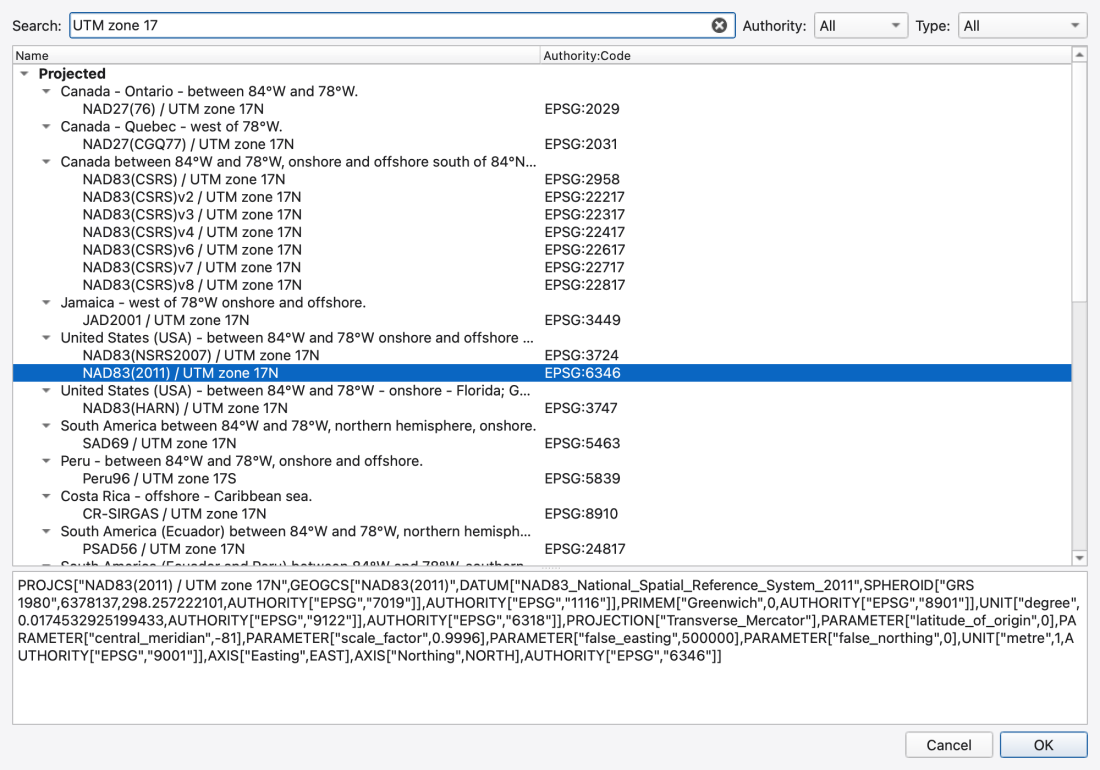
Select Coordinate Reference System browses the GDAL/PROJ CRS database.
| Control | What it does |
|---|---|
| Search | Free-text filter over CRS names and codes — type a name or an EPSG number. |
| Authority | All, or a single authority (EPSG, ESRI, …) contributed by the CRS database. |
| Type | All, Geographic 2D, Geographic 3D, Projected, Compound, Geocentric. |
| Tree | Grouped Type → Area of use → CRS, with the Authority:Code in the second column. State planes group by state, UTM zones by region. |
| WKT preview | The full WKT definition of whatever is selected. |
Above the database entries sits a synthetic Local (no transform) group with two leaves — Local — metres (no transform) and Local — feet (no transform). These mint a CRS that carries a real linear unit but performs no transformation, for data whose units are known but whose georeference is not. The group is hidden when an authority filter or a mismatching type filter is active.
There is no recent-CRS list and no free-form WKT/PROJ entry box in this release: pick from the database or use one of the two Local entries.
Picking a different CRS while a model with geometry is open opens Change Coordinate Reference System, which states the From and To authorities and offers these choices:
| Choice | What it does | When to pick it |
|---|---|---|
| Assign CRS without changing coordinates | Declares what CRS the existing numbers already use. The model and canvas adopt it, the geometry cache is rebuilt, and the project is marked dirty. | An unreferenced dataset whose coordinates are already in the chosen CRS. An empty project uses this automatically. |
| Reproject stored coordinates | Transforms every node coordinate, link vertex and subcatchment polygon vertex through OGR from the old CRS to the new one, and writes the new CRS to the engine. The layer and the canvas both adopt it, the geometry cache is rebuilt, the view refits, and the project is marked dirty. | The new CRS is the correct one for the data and you genuinely want the model converted into it. |
| Re-render only (display in new CRS) | Stored coordinates are untouched. Only the canvas CRS changes; the layer is reprojected for display. Nothing is written to the model. | The stored coordinates are correct and you only want a different view — e.g. Web Mercator to line up with online tiles. |
Cancel leaves everything as it was. When the source CRS is Local, only Assign CRS is available: no geographic transform can be built from an unreferenced local grid. Assign a known source CRS first if the existing coordinates already use it; then choose a target CRS and reproject.
Reprojection is best-effort and batched: a single object that fails to transform is logged and skipped, and the rest still get done. The Message Logs panel reports the counts — nodes, link vertices, polygon vertices.
FIGURE PLACEHOLDERdocs/manual/images/06_crs_change_dialog.png
Committing a CRS sets the model's CRS string, which is saved in [OPTIONS]:
The value is the authority code when the CRS has one, and the full WKT otherwise. The engine stores it as metadata and preserves it in hot-start files for consistency checking; it never uses it to transform anything itself. All coordinate transformation happens in the GUI.
Reprojection changes the in-memory model immediately, but the file on disk only changes when you Save.
Model → Simulation Options… → Spatial & CRS shows the model layer's CRS and its extent.
| Control | What it does |
|---|---|
| Layer CRS | Read-only label; (local) or (none) when unset. |
| Change… | Would open the CRS picker and assign the result to the layer — inert in this build; the button is never connected to anything. |
| Detect from coordinates | Would inspect the model extent and suggest EPSG:4326 when it fits inside geographic bounds — inert in this build for the same reason. |
So the page is a read-only summary today: use the status-bar CRS button or Model → Set Project CRS… to actually change the CRS. The page also carries its own reminder that changing the CRS there would update the stored CRS only; the status-bar button is what transforms stored coordinates. See 18 — Simulation Options.
Every layer carries its own CRS and is reprojected into the canvas CRS as it is drawn — vectors and annotations by transforming their geometry, rasters and tiled services by warping into the canvas grid. When a layer's CRS already matches the canvas the transform is skipped entirely, so a project whose layers all share one CRS pays nothing for the machinery.
A layer's CRS is visible and editable in Properties… → Source (see 07 — Layers and Data Sources). A vector file that declares no CRS is assumed to already be in the project CRS, and a warning naming the file is written to the Message Logs — this is the usual reason a layer lands somewhere unexpected.
The canvas CRS determines what a map unit means, and therefore:
See 05 — The Map Canvas.
The 2D solver works in SI metres regardless of the model's flow units, so 2D data has to be scaled back before it can be drawn with the rest of the model.
.2dm (or the inline [2D_*] sections) in model units and reprojects from the model CRS to the canvas CRS, like any other vector layer. The mesh file's ;; UNITS: header records whether its coordinates are SI.The metres-per-model-unit factor comes from the results file itself when the file declares one (engine 6.0 and later write a /crs variable), which makes the round trip exact — including the engine's use of the international foot (0.3048) for a CRS whose own unit is the US survey foot. For an older file, or for the live in-process results source, the factor is derived the same way the engine derives it: US-customary flow units and a mesh that is not tagged ;; UNITS: SI (m) gives 0.3048; anything else gives 1.0. A single warning naming the layer is logged when the factor had to be inferred.
The practical consequence: if 2D results appear shrunk toward the CRS origin while the mesh and the 1D network draw correctly, the results file predates the self-describing /crs variable and the mesh's units header is being read instead. Re-exporting the results with a current engine fixes it.
FIGURE PLACEHOLDERdocs/manual/images/06_2d_results_alignment.png
The commonest cause of a network that "doesn't sit on" a basemap is a wrong CRS — usually a neighbouring UTM zone or state-plane zone. Symptoms:
The fix is to open the CRS picker, choose the correct CRS for the data, and pick Assign CRS without changing coordinates — your stored coordinates were fine, only their interpretation was wrong. If you don't know which CRS is correct, try the plausible ones for the region; the one that lines up is the right one.
Choose Reproject only when the old CRS was correct and you want the model converted into a new one.
.inp on disk is unchanged.EPSG:3857 after loading an EPSG:4326 model — that is deliberate and keeps the aspect ratio honest..prj is assumed to be in the project CRS. Watch the Message Logs for the warning when a newly added layer lands oddly.;; UNITS: header 1.9.8
1.9.8